
Manufacturer Sorting
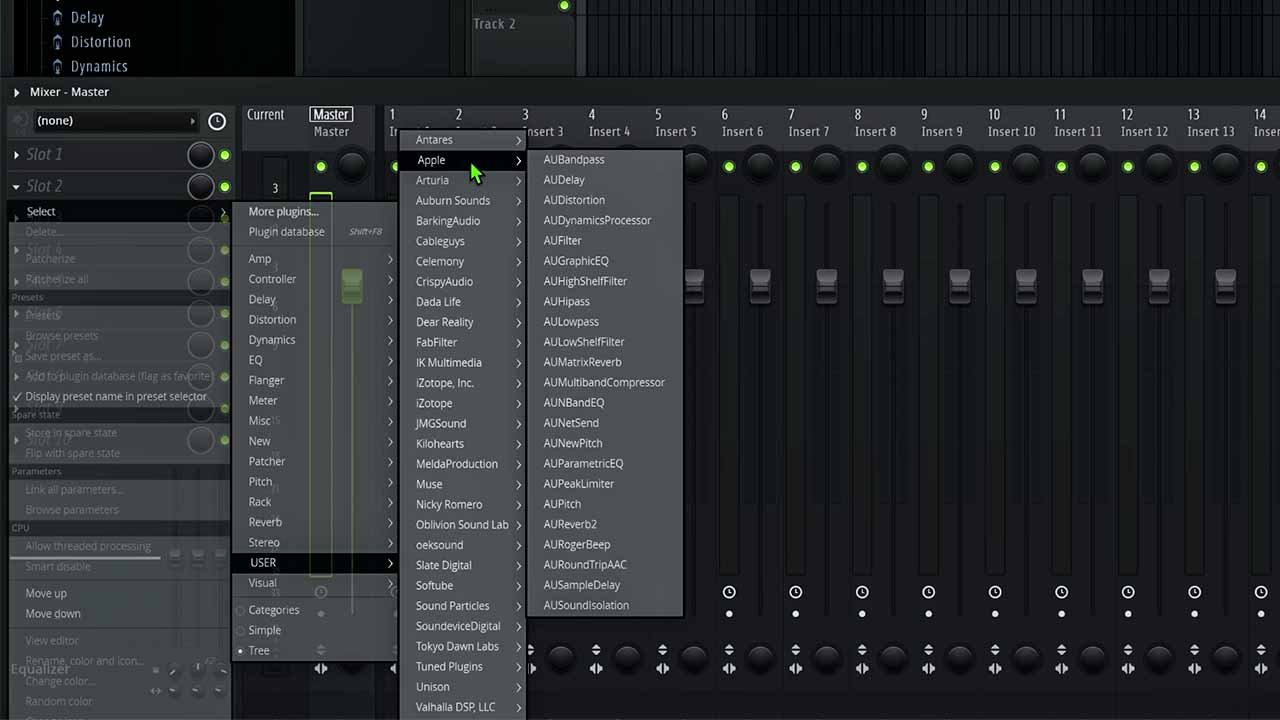
Automatically group plugin entries by manufacturer so related plugins (like FabFilter, Waves, Arturia) are perfectly clustered together.
Automatic Plugin Database Organizer & Arranger
FL Plugin Arranger is a lightweight native utility that automatically arranges your plugin database entries by manufacturer, making massive plugin collections a breeze to navigate.
Features
Version 2.0 brings powerful new capabilities focused on helping you keep your production environment organized and intuitive.
Automatically group plugin entries by manufacturer so related plugins (like FabFilter, Waves, Arturia) are perfectly clustered together.
Select your exact plugin database directory manually, or simply let the app intelligently find the default FL Studio location for you.
Never miss a feature. The app quietly checks for new versions and presents an elegant alert with release notes when an update is available.
Experience a beautiful, glassmorphic UI with smooth animations, dark mode aesthetics, and an incredibly simple user experience.
Engineered natively. Version 2.0 features fully optimized, fast builds specifically tuned for Windows, Apple Silicon, and Intel Macs.
It doesn't install or delete your actual plugins. It strictly manages the FL Studio browser shortcut files, ensuring your projects are 100% safe.
How it works
Always copy your existing FL Studio Plugin Database folder somewhere safe before making changes. This gives you peace of mind.
Open FL Plugin Arranger, enter your one-time license key, and confirm your database location.
Hit the organize button. The app intelligently scans and groups your plugins into pristine manufacturer folders in seconds.
Before using any plugin organization utility, create a backup of your FL Studio Plugin Database folder. This guarantees you can instantly restore your previous structure if needed.
FL Plugin Arranger is a file organization utility. It does not replace FL Studio, install paid plugins, or alter your saved audio projects.
Downloads
Install the software on your system right now. To unlock the functionality, simply purchase a one-time activation key below.
Pricing
Regular price ₹999
Get your Activation Key for a simple one-time price. Unlock the software instantly to enjoy automatic updates and cleaner manufacturer-based plugin organization forever.
FAQ
It helps organize FL Studio plugin database entries by manufacturer so your plugin browser is incredibly fast and intuitive to navigate.
Yes. The software is compiled natively for Windows 10/11 and macOS, ensuring peak performance on both Apple Silicon (M1/M2/M3/M4) and Intel architecture.
Yes. Version 2.0 introduces manual folder selection, giving you full control if your FL Studio database isn't in the default Documents location.
No. It is purely an organization utility. It reads the files you already have and cleanly categorizes their database shortcut entries.
Yes. We strongly recommend duplicating your FL Studio Plugin Database folder before running any organizational tools so you can easily revert if you change your mind.
Need help after purchase? Contact support with your order details and operating system.
Due to the nature of digital goods, all sales are final. Please manually try organizing a backup of your plugins first to ensure this workflow fits your style.
Platform updated for the Version 2.0 native release. Site design upgraded to meet accessibility and performance standards.